Layer 03 — Record
Custom CRM
development
A CRM shaped like the way you already sell, instead of a process your team has to adopt because the software insists on it.
01 — The problem with the big ones
Forty features,
four in use
The large platforms are good software. The difficulty is that they are built to fit every business, which means they fit yours approximately.
What that looks like day to day: fields nobody fills in, a pipeline whose stages don’t match your real ones, a per-seat bill that grows with headcount, and a workaround in a spreadsheet that has quietly become the actual system.
Symptoms we hear
- “We only use it as a contact list.”
- “The real pipeline is in a spreadsheet.”
- “Nobody logs calls because it takes too long.”
- “We pay for twelve seats and four people open it.”
- “Reporting is a person exporting to Excel every Monday.”
What that actually costs
- Enquiries that sit unworked because nothing surfaces them.
- No reliable answer to what is in the pipeline right now.
- Staff hours spent maintaining the workaround, every week.
- A subscription scaling on headcount rather than on value.
- Institutional memory living in one person’s head.
02 — What we build
What’s in a
custom CRM
Not everything below is in every build. The diagnosis decides which of these you actually need, and we would rather ship four things that get used than twelve that don’t.
A queue, not a dashboard
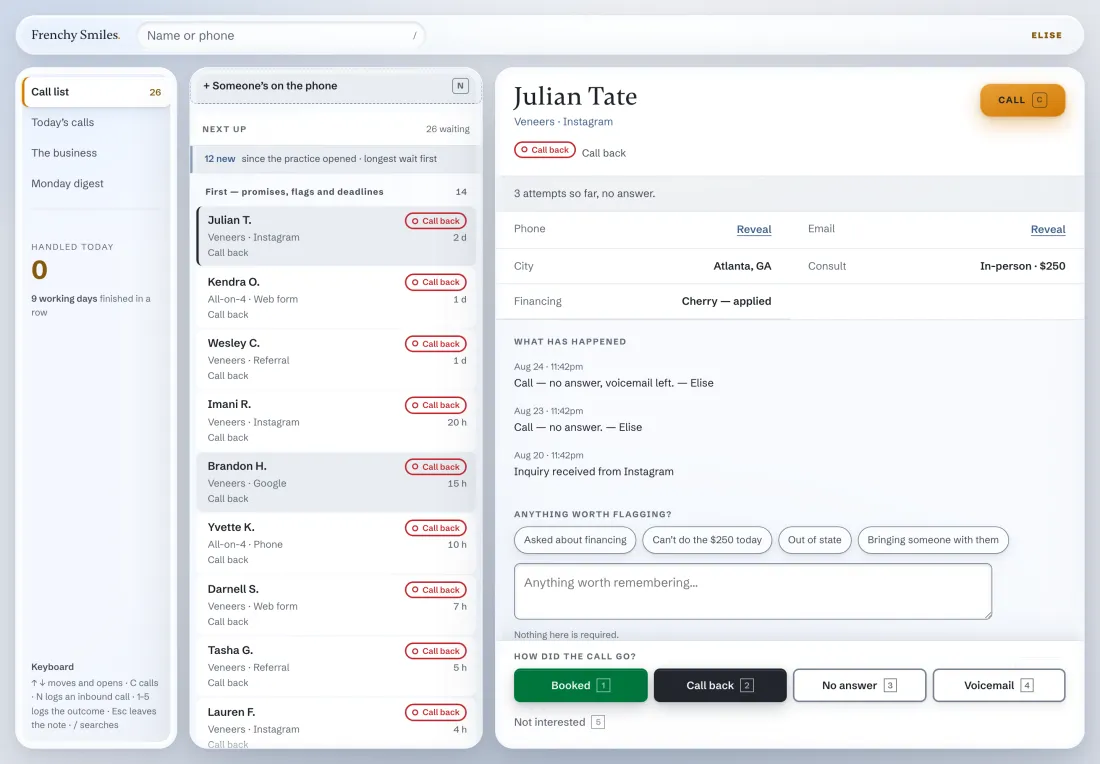
The main screen answers one question: who do I deal with next. Ordering is a rule you choose — longest wait, highest value, nearest deadline — and it is applied consistently rather than left to whoever is looking.
Your stages, your fields
The pipeline uses the names your team already says out loud. If a deal in your business goes quote → site visit → deposit → scheduled, that is what the software says.
One-keystroke logging
If recording an outcome takes four clicks and a dropdown, it stops happening within a fortnight and your data goes stale. Logging has to be faster than not logging.
A full history per record
Every call, note, status change and automated message against one person, in order, with a name attached. New staff can pick up a conversation cold.
Roles and permissions that mean something
Who can see what, who can change what, and who can grant a role — decided deliberately. In regulated work, who opened a record is recorded too.
Reporting that doesn’t need an export
The handful of numbers you actually run the business on, on a screen, current. Not a spreadsheet somebody rebuilds every Monday morning.
03 — Evidence
One we
have built
The CRM below is real software, currently deployed. The data in the screenshot is demonstration data, not patients.
04 — Straight answer
When you should not build one
Stay where you are if
- Your team genuinely uses the tool you have and the complaints are small.
- Your process is standard enough that adopting the tool’s way costs you nothing real.
- You need something running in days rather than weeks.
- Your enquiry volume is low enough that one organised person is honestly cheaper.
Build if
- The real pipeline already lives outside the CRM you pay for.
- The way you work is a competitive advantage the software makes you abandon.
- You have privacy, audit or compliance requirements a generic tool won’t meet.
- Seat costs are growing faster than the value you get from the tool.