Capture One front door
Every enquiry — the DM, the form, the phone, the referral — lands in the same queue in the same shape, with its source recorded, and nothing depending on who happened to be looking.
Lead capture systems & websitesBusiness systems engineering
Growing companies run on tools that don’t talk to each other, so their people become the integration. We find where that leaks leads, hours and visibility, then engineer the missing system around the business.
01 — The problem
Your business shouldn’t run between ten disconnected tools. Most do. Each one is fine alone. Between them sits a person doing copy and paste — and that person is the integration layer. That is where the leads, the hours and the visibility go.
A form, an inbox, the phone, and DMs. Nobody is certain which one holds the newest, so some are answered in minutes and some are never seen at all.
Whether someone gets a second call depends on whether a person remembered. The ones who needed two calls are the ones you lose.
Out of the form, into a spreadsheet, into the calendar, into the billing tool. Every retype is time spent and a chance to get it wrong.
You can find out what happened last month. You can’t find out what is happening this afternoon without asking three people.
They told the form, then the phone, then the person at the desk. Each tool knew a piece; none of them knew the customer.
The service costs five figures. The site looks like it cost four hundred dollars. People decide before they ever speak to you.
You almost certainly don’t have all six. One or two, costing real money every week, is usually enough to justify building something.
02 — The operating layer
Almost nobody is missing software. What’s missing is the layer between the tools — the part no vendor sells, because it only exists for your business.
We study how work actually moves through the operation, then engineer that layer: capture, routing, the record, the automation and the reporting, connected end to end and built around the tools you already run. Not a deck describing it. The system itself, built to be installed in your business, with your team trained on it, and yours to keep.
03 — Capabilities
Not seven services to pick from. These are the layers of one operating system, in the order an enquiry passes through them. Each one names the capability that builds it.
Every enquiry — the DM, the form, the phone, the referral — lands in the same queue in the same shape, with its source recorded, and nothing depending on who happened to be looking.
Lead capture systems & websitesAn enquiry reaches whoever should act on it by rule, not by whoever notices first. Speed to first contact is the one number almost nobody is actually managing.
Speed-to-lead & routingA pipeline shaped like your actual sales process, holding one record that everything else reads from — not a generic deal board you bend your team around.
Custom CRMSorting, drafting, summarising, the second and third follow-up — handled automatically, with a person still deciding what matters and an off switch they can reach.
Follow-up, workflow & AI automationBuilt for the four things they actually do all day instead of the forty they don’t: a queue, a job board, an approvals list, a dispatch view.
Internal toolsIntegrations that hand work between the systems you already pay for — and a straight answer where a vendor has no usable API, rather than something fragile built on a workaround.
Business integrationsThe handful of numbers you run the business on, on a screen, current — without someone exporting to a spreadsheet every Monday morning.
Reporting & dashboardsFew businesses need all seven layers. The audit decides which ones matter for yours, and in what order.
Every capability04 — Proof
A porcelain veneer practice in Atlanta with an Instagram following, no website, and a Google Form for a booking system. We built the site, then the system behind it. The same enquiry, drawn before and after.

Before
After · site live, CRM staged
The website half of this is live and public — the Google Form has been retired. The CRM half is built and staged: it has not yet run with real patients, because launch is held until the vendor Business Associate Agreements are signed. Every screenshot runs on demonstration data.
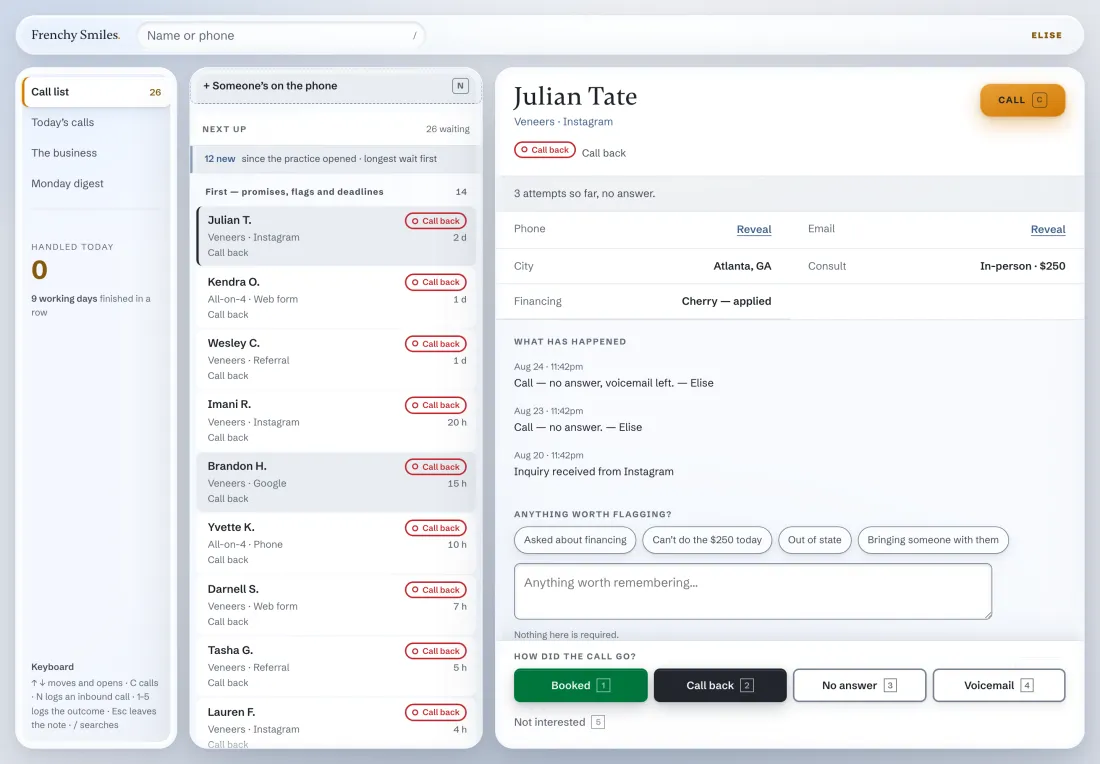
Fig. 02The staff CRM — built and staged, not yet liveDemonstration data
05 — How we work
Five moves, in a fixed order. The first two can end with us telling you the build isn’t worth doing yet — and the audit is where that gets decided.
We follow the work through your business — where enquiries land, what gets retyped, which handoff drops things, which tools have a usable API.
You get the leaks, named and estimatedThe System Map: a written document of where the operation leaks, what closes it, what it takes to build, and in what order. Useful whether or not you hire us.
You get the System MapWritten to a fixed spec and a fixed date, in stages you can look at as they land. Nothing is a surprise at the end because you have seen it the whole way.
You get something to look at, every stageIt goes into the real workflow, with your data, your people and the tools you keep. We train the staff who will be in it every day.
You get a working system, in your nameOn a retainer the system never sits still: changes almost daily in the first weeks while it beds in, then an optimization pass over everything we run for you — usually every month, never less than once a quarter.
You get a system that keeps improving06 — Straight answer
It is better in specific conditions and a waste of money outside them. Here is where the line sits, so you can work out which side you are on before you talk to us.
07 — The guarantee
We guarantee what we control. The build matches the spec we agreed in writing, it ships on the date we set, and it does what the spec says when it lands. If we miss that date for a reason that belongs to us, you don’t pay for the overrun. Paperwork that belongs to you or a vendor — a signed agreement, an API you have to be granted access to — sits outside the date, and we say which parts those are before anything starts.
We do not guarantee lead volume, revenue or conversion rate, because those depend on your market, your offer and your team — three things we don’t control. Anyone who promises you a number for them is guessing, and you will be the one who finds out.
Everything we build is yours: the code, the data and the accounts, in your company’s name. If we part ways, it keeps running and someone else can pick it up.
08 — Questions
The six that come up on nearly every first call.
Software. Specifically: custom CRM systems, lead capture and routing, automation for repetitive work, internal tools your staff use daily, integrations between systems that don’t currently talk, and the websites that feed all of it. It is written for your business rather than configured from a template.
Usually not, and we’ll say so early if replacing something would be a mistake. On the Frenchy Smiles build the practice’s clinical records system and phone system both stayed exactly where they were — we built around them. We replace a tool only when keeping it costs more than removing it.
Often, but not always, and the honest answer depends on the tool. Some vendors publish an API anyone can use. Some gate it behind a partner agreement. Some have nothing at all, in which case we will tell you that rather than quietly building something fragile on top of a workaround.
Time from the people who know the work. The diagnosis stage needs a few conversations with whoever handles enquiries and whoever runs operations. During the build we come back with things to look at. At install, your team needs an hour or two of training. Beyond that we stay out of your way.
Yes. The code, the data and the accounts are yours, and the infrastructure is set up in your company’s name where that is possible. If you and LockPoint part ways, the system keeps running and someone else can pick it up. We’ll put that in writing before anything starts.
Available, not compulsory. Clients on a retainer get a standing optimization cadence: changes almost daily in the first weeks while the system beds in, then a pass over everything we run for them — the site, the CRM, the automations — usually every month, and never less than once a quarter. Others take the handover, run it themselves and come back when they want the next thing built. Both are fine. What a retainer costs depends on the system, and we quote it against the real thing rather than a price list.
Next step
The audit is a short piece of work: a few conversations with whoever handles enquiries and whoever runs operations, then we follow the work through your tools. It ends in a System Map — where your operation is leaking, what a system would close, what it would take to build, and in what order. Sometimes it concludes that you don’t need us yet. You get told that too. How long it takes depends on the size of the operation, and you have the scope in writing before it starts.